CLICK HERE TO REGISTER WITH PAYLOCITY
Registration Tips:
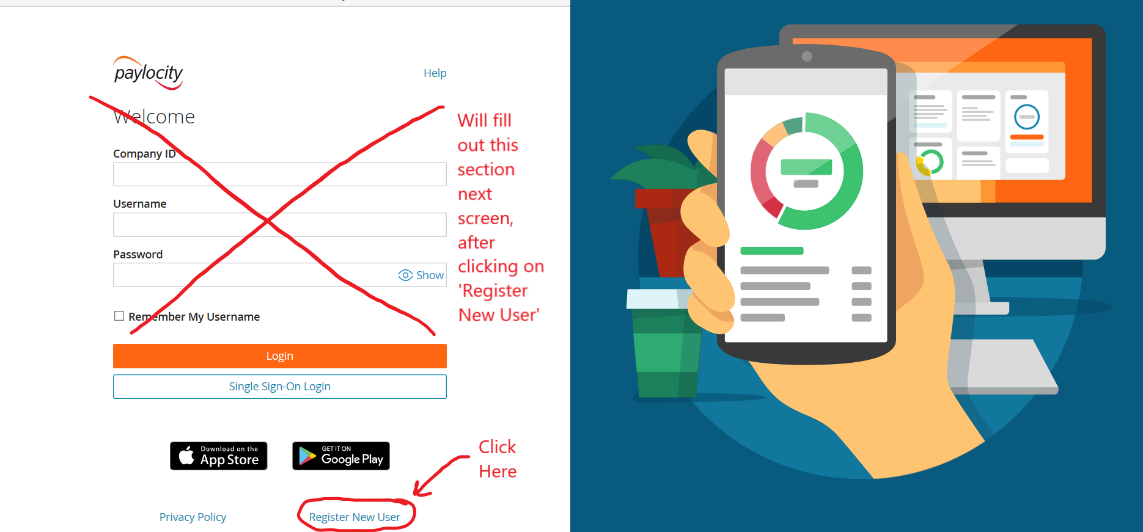
- After clicking on the link you will see the page shown in the image below open.
- At the bottom right hand corner of the Welcome screen, click on Register New User (see circled in red in the image below).
- Once you click on the Register New User link, the Register Your Account screen opens:
- The company ID is 98661
- Proceed to enter your information.
- After entering the information, click Continue
- The Setup Your Account screen opens:
- Enter a username (not case-sensitive) and Password (IS case-sensitive) of your choosing, noting the password rules circled in the image above.
- Enter the password again a second time in the Confirm Password field.
- Provide one of the following:
- Personal email address
- Mobile phone number
- Select Continue
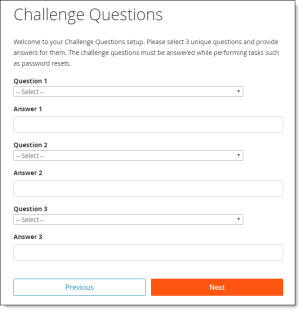
- The Challenge Questions screen is the last step.
- Choose your challenge questions 1, 2, and 3 and input answers.
- Select Next
- Select Finish to create your new user account and enter to view the Community section of Paylocity.
- Please keep in mind that all of the HR & Payroll functions are not yet fully rolled-out or functional.